EMT Practice Test

1. Question Content...


Question List

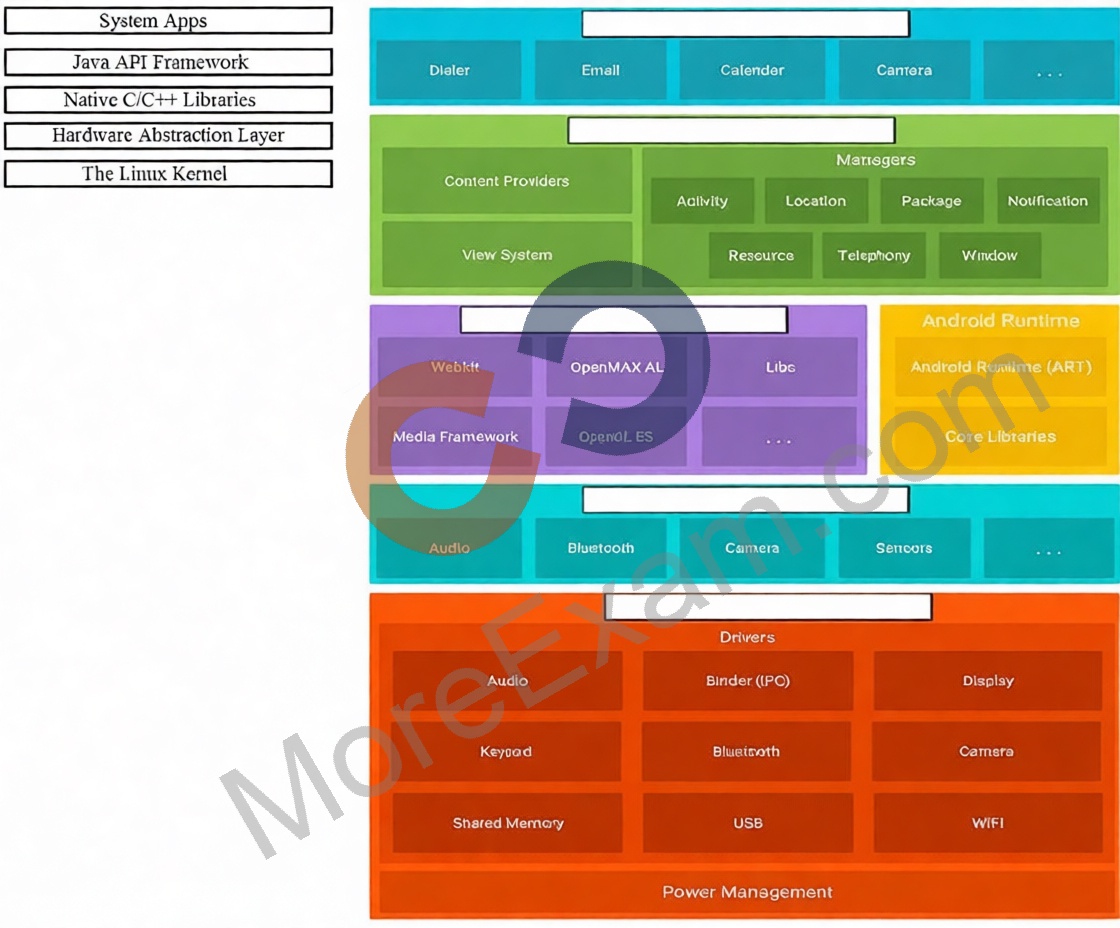
Question1: Move the major components of the Android platform to correct places in diagram.
Question2: SharedPreferences.Editor is an interface used for modifying values in a SharedPreferences object. To mark in the editor that a preference value should be removed, which will be done in the actual preferences once commit() or apply() is called, what method in SharedPreferences.Editor should we use?

Question3: "workManager" is an instance of WorkManager. Select correct demonstration of WorkRequest cancellation:

Question4: As an example. In an Activity we have our TimerViewModel object (extended ViewModel), named mTimerViewModel. mTimerViewModel.getTimer() method returns a LiveData<Long> value. What can be a correct way to set an observer to change UI in case if data was changed?

Question5: What method should we use with Notification.Builder to supply a PendingIntent to be sent when the notification is clicked?

Question6: To run a debuggable build variant you must use a build variant that includes

Question7: Choose the most correct statement.

Question8: By default, the notification's text content is truncated to fit one line. If you want your notification to be longer, for example, to create a larger text area, you can do it in this way:

Question9: In general, you should send an AccessibilityEvent whenever the content of your custom view changes. For example, if you are implementing a custom slider bar that allows a user to select a numeric value by pressing the left or right arrows, your custom view should emit an event of type TYPE_VIEW_TEXT_CHANGED whenever the slider value changes. Which one of the following sample codes demonstrates the use of the sendAccessibilityEvent() method to report this event.

Question10: In application theme style, flag windowNoTitle (<item name="windowNoTitle">) indicates:

Question11: The easiest way of adding menu items (to specify the options menu for an activity) is inflating an XML file into the Menu via MenuInflater. With menu_main.xml we can do it in this way:

Question12: To build a debug APK, you can open a command line and navigate to the root of your project directory. To initiate a debug build, invoke the assembleDebug task:
gradlew assembleDebug
This creates an APK named [module_name]-debug.apk in [project_name]/[module_name]/build/outputs/apk/ Select correct statements about generated file. (Choose all that apply.)

Question13: Select correct demonstration of WorkRequest cancellation.
Question14: In a class PreferenceFragmentCompat. What method is called during onCreate(Bundle) to supply the preferences for this fragment. And where subclasses are expected to call setPreferenceScreen (PreferenceScreen) either directly or via helper methods such as addPreferencesFromResource (int)?

Question15: Assume that you have the following situation: The app code calls for R.string.text_a Three relevant resource files are available:
- res/values/strings.xml, which includes text_a in the app's default language, in this case English.
- res/values-mcc404/strings.xml, which includes text_a in the app's default language, in this case English.
- res/values-hi/strings.xml, which includes text_a in Hindi.
The app is running on a device that has the following configuration:
- The SIM card is connected to a mobile network in India (MCC 404).
- The language is set to Hindi (hi).
Which is the correct statement below?

Question16: About running a debuggable build variant. Usually, you can just select the default "debug" variant that's included in every Android Studio project (even though it's not visible in the build.gradle file). But if you define new build types that should be debuggable, you must add 'debuggable true' to the build type. Is that mostly true?

Question17: For example, our preferences.xml file was added by addPreferencesFromResource (R.xml.preferences). Our preferences.xml file contains such item:
<ListPreference android:id="@+id/order_by" android:key="@string/pref_sort_key" android:title="@string/pref_sort_title" android:summary="@string/pref_sort_summary" android:dialogTitle="@string/pref_sort_dialog_title" android:entries="@array/sort_oder" android:entryValues="@array/sort_oder_value" android:defaultValue="@string/pref_default_sort_value" app:iconSpaceReserved="false" /> In our Fragment, we can dynamically get current notification preference value in this way:

Question18: What is illustrated in the picture?

Question19: As an example. In an Activity we have our TimerViewModel object (extended ViewModel), named mTimerViewModel. mTimerViewModel.timer method returns a LiveData<Long> value. What can be a correct way to set an observer to change UI in case if data was changed?

Question20: What do you want from Room when you create a DAO method and annotate it with @Delete?
Example:
@Dao
public interface MyDao {
@Delete
public void deleteUsers(User... users);
}

Question21: In general, you should send an AccessibilityEvent whenever the content of your custom view changes. For example, if you are implementing a custom slider bar that allows a user to select a numeric value by pressing the left or right arrows, your custom view should emit an event of type TYPE_VIEW_TEXT_CHANGED whenever the slider value changes. Which one of the following sample codes demonstrates the use of the sendAccessibilityEvent() method to report this event.

Question22: Android Tests. You can use the childSelector() method to nest multiple UiSelector instances. For example, the following code example shows how your test might specify a search to find the first ListView in the currently displayed UI, then search within that ListView to find a UI element with the text property Apps.
What is the correct sample?

Question23: For example, we have a file in our raw folder app/src/main/res/raw/sample_teas.json. To get an InputStream for reading it, from out Context context, we can do this:

Question24: Which build options in the Build menu to choose to delete all intermediate/cached build files.

Question25: With our Context we can get SharedPreferences with a method, named: getSharedPreferences (String name, int mode). What value can we transfer in a "mode"parameter?

Question26: The easiest way of adding menu items (to specify the options menu for an activity) is inflating an XML file into the Menu via MenuInflater. With menu_main.xml we can do it in this way:

Question27: To create a basic JUnit 4 test class, create a class that contains one or more test methods. A test method begins with the specific annotation and contains the code to exercise and verify a single functionality in the component that you want to test. What is the annotation?

Question28: For example, our preferences.xml file was added by addPreferencesFromResource (R.xml.preferences). Our preferences.xml file contains such item:
<ListPreference android:id="@+id/order_by" android:key="@string/pref_sort_key" android:title="@string/pref_sort_title" android:summary="@string/pref_sort_summary" android:dialogTitle="@string/pref_sort_dialog_title" android:entries="@array/sort_oder" android:entryValues="@array/sort_oder_value" android:defaultValue="@string/pref_default_sort_value" app:iconSpaceReserved="false" /> In our Fragment, we can dynamically get current notification preference value in this way:

Question29: In a class PreferenceFragmentCompat. As a convenience, this fragment implements a click listener for any preference in the current hierarchy. So, in what overridden method we can handle that a preference in the tree rooted at this PreferenceScreen has been clicked?

Question30: In a class extended PreferenceFragmentCompat. What method is used to inflate the given XML resource and add the preference hierarchy to the current preference hierarchy?

Question31: What do you want from Room when you create a DAO method and annotate it with @Update?
Example:
@Dao
interface MyDao {
@Update
fun updateUsers(vararg users: User)
}

Question32: Under the hood WorkManager uses an underlying job dispatching service based on the following criteri a. You need to move services to the correct places.

Question33: The Layout Inspector in Android Studio allows you to compare your app layout with design mockups, display a magnified or 3D view of your app, and examine details of its layout at runtime. When this is especially useful?

Question34: In application theme style, flag windowActionBar (<item name="windowActionBar">) indicates: